2025-12-23 01:00
Projects Artificial Intelligence AI Computer Vision development
Arctic Skies, aeye, Picsort and a Giant Yak!
Hello, Internet! We’re nearing the end of the year, and what better way to celebrate than with a slightly longer article to tell a story!
In 2024, I moved to the Arctic Circle, where the northern lights are a common sight. However, it’s not something you just look out the window and, poof, there it is every night. No, the aurora borealis requires special conditions, the main one being clear skies. Since I have other things to do with my life and I enjoy automating things, the first thought that crossed my mind was: “How cool would it be to have a camera on the balcony, streaming 24/7 with a computer vision model sending me notifications when the aurora is visible?”. And so the adventure began, a project that has been taking up a good chunk of my time for the last year and is still not quite finished!
The streaming part was easy. Although I iterated through several cameras and methods, the architecture is simple. It started with a simple Raspberry Pi and a webcam on the balcony, but I felt I needed something a bit more robust that could withstand being right outside. Since I already had a Ubiquiti Dream Machine router, I ended up settling on a small Ubiquiti G4 Instant. The Unifi ecosystem makes everything simple: Unifi Protect manages the camera, records 24/7, publishes the RTSP stream, and then OBS runs on a machine that streams to Twitch and YouTube. Maybe one day I’ll publish a more technical article about this, but for now, let’s leave it at that!
The next step, the yak shaving, began! After a few hours of research, I quickly discovered that there are no computer vision models for detecting northern lights. So, I had to create one, but clearly, I had no idea how to do it! Any search I did ended up in scientific papers about neural and convolutional networks, things that to this day I still don’t understand how the heck they work. I just really wanted to know how to train a computer vision model! This is where LLMs can become very powerful and save hours and hours of research! After a bit of chatting, I understood that I needed a dataset with images to train the model, Python, TensorFlow, and Keras!
The Dataset
Dataset? Easy! Arctic Skies had been recording for a while, so I had plenty of timelapses. I downloaded all of them and quickly wrote a script to extract every frame. I created another script to organize the images, which was quite simple: it iterated through all the images, and I just had to press ‘Y’ for each image with an aurora and ‘N’ for images without. These images were then moved to their respective directories named ‘1’ and ‘0’.
The First Model
“Vibe coding” isn’t really my thing, but I still had the LLM spit out some code to train the first model and to help me get an idea of how this all works. However, at this point, I didn’t pay much attention, I just wanted a basic script that would train the model with my images. After all, even though I don’t quite understand how it works, training these types of models is a well-known and solved problem, right? How hard could it be? Famous last words… After this, with the help of an LLM, I managed to create the first script to train the model, still without understanding much of what was going on.
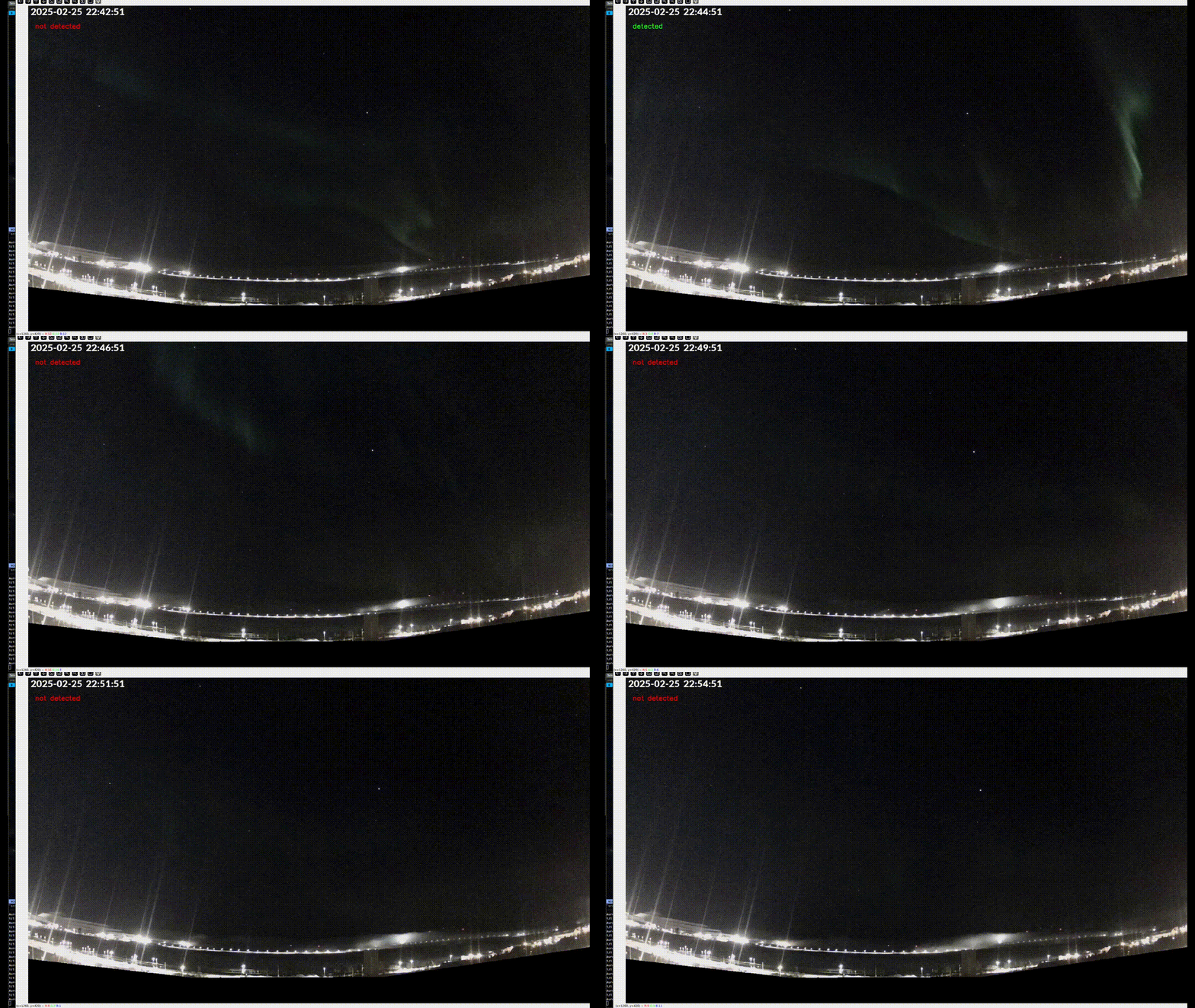
Fantastic! The first model was trained and it was worki… uh oh!
Aeye and Inference
I regret not saving the training results of the first models, but what follows will probably give you an idea. Here I learned the meaning of “inference,” and for this purpose, the first side quest project was born: aeye. The requirements for this script were simple: subscribe to the RTSP stream published by Unifi Protect, perform inference on one frame per second, and export the result in a way that can be used in real-time. The script is here and it has remained almost unchanged throughout the entire process. OpenCV opens the stream and extracts a frame every second, TensorFlow loads the model and performs the inference, and of course, the results are exposed as Prometheus metrics. This way, I can use Grafana to observe real-time data, historical data, and create alerts!
It didn’t take many days of running the inference to realize that although the model could identify obvious auroras, it was also identifying clouds and other artifacts as auroras! Back to square one!
After a few more lines of chat and research, I became convinced (little did I know!) that to solve the problem I had to get more images, let’s say at least 800 images for each class. As soon as I looked at the number of images I had to organize, I felt sick to my stomach!
Changing the script I previously used to separate images by class was not a viable option at all. The script works directly on the filesystem, starts at the first image and ends at the last, not allowing me to go back or change wrong decisions. As an avid Neovim user, the repetitive use of the mouse for productivity tasks disgusts me, so the idea of using a file explorer for this task was out of the question! Darktable? It almost took the prize, but it’s so focused on photography that tagging and filtering images wasn’t very intuitive, and it uses its own metadata system! After some research, I found other tools, some open-source, others proprietary. Some promised to be extremely fast, yet as soon as I tried to load over 1000 images, it felt like I was back in the stone age. Others were not clear or intuitive at all. Nothing seemed to fit the purpose, and a seed began to sprout: the idea of creating an application for this purpose started to take shape!
How Hard Can It Be?
After so much frustration trying different applications and tools, the ultimate phrase started repeating over and over in my head:
“I’m not a developer by trade, but I’m already comfortable with Go. It can’t be that hard to create an application that does exactly what I need!”
Since I wanted to learn a bit more about web development, I decided to develop the concept as a web application, even knowing that this wouldn’t be the ideal format for this type of project and that I would later throw it away. The main goal was just one: to help me better understand my idea, to figure out exactly what I want and what I need, and in the process, learn something new! Deciding on the stack was easy: a monolith with Go, HTMX, and JavaScript. Simple? Of course… it didn’t take long for the headaches to start. Naturally, I decided to test the hype around LLMs. Every day someone was writing on X or making a YouTube video about how they used an LLM, with just a simple prompt, to generate an application that made them rich! If an LLM can do that, then maybe it can also make my simple application, right? Let’s just leave it at this… no, LLMs are not going to replace programmers anytime soon!
From typos to forgetting half of the task, no amount of grandmother hearth attack or chaos orbs tricks was enough to get a functional application! I don’t mean to say that using LLMs wasn’t helpful! In fact, without them, I wouldn’t have been as fast or learned as much. However, the approach had to change! Since what I know least is frontend, I started there and asked it to design each part of the UI in isolation. First, the container for the whole application, then the container for the preview, then the thumbnails… and so I went, deconstructing the problem into several smaller problems, with the proper context, using the LLM as an assistant and a tutor instead of a programmer! It’s not the goal of this article to go too deep into what was done, but after several iterations, between frontend and backend, the prototype of the application was done. It was possible to upload images, move them between the various containers, export… all this just with the keyboard and with VIM-style navigation! The final result is available here: https://picsort.coolapso.sh, but it’s very possible that it will be taken down, as the application is not viable at all: it works directly on the filesystem, there is no caching whatsoever, and obviously, I’m limiting its use to about 100 images, not to mention it raises serious privacy concerns since there is no encryption of any kind!
Obviously, this little adventure cost time, which at that point was divided among several other things, making it even more complicated. We’re talking about a little over a year having passed since I started, and I still didn’t have a computer vision model ready for when winter and the aurora season arrived! Fortunately, I had the opportunity to reorganize my priorities and was able to dedicate more time to this project. Once I had a better idea of what I wanted, it was time to start developing the desktop version of Picsort and finally get the dataset images organized. Of course, this part of the project did not come without its share of headaches and side quests.
To develop the desktop version of Picsort, I decided, obviously, to use Golang and the Fyne toolkit. And because I decided that the original images are sacred and the application should not operate directly on the files, I opted for SQLite, especially since it might be useful later to have the same image in multiple classes!
The hardest part was understanding how to use Fyne to design the application. It’s a completely new field for me and, after several hours (maybe days) fighting with LLMs and their hallucinations, I started to better understand how to create applications with Fyne. It was only later, when I joined the Fyne developers’ Discord and started talking about what I was trying to do, that I really understood some of Fyne’s opinions and that, in fact, I was trying to do something this library was not prepared for. This resulted in several really useful and educational discussions and several pull requests with bug fixes and new features! For example, #5961, where a new callback was added, or #5996, which fixes a bug in grid navigation, among others motivated by some features implemented in Picsort, which at the time of writing this article are still pending approval! These features were implemented after finishing the application and starting to use it to organize the images, as I realized that some of the previous ideas didn’t work well or that I was constantly missing some navigation shortcuts!
This Is It! Or Maybe Not…
With Picsort finished and the first versions available, I now had my dataset organized and ready to train the new version of the model! With the aeye script already prepared to train multi-class models, I was full of confidence that this was it. But not yet! After training, the model ended up with about 30% accuracy, which means it spends most of its time “guessing” what it’s seeing! It was here that I understood the importance of splitting the images into 3 datasets: 60% of the data for training, 20% for validation, and another 20% for the final test. For this, I had to develop some more features for Picsort, so that this separation could be done automatically and properly! But with these new numbers, it meant I now had far fewer images to teach the model the different classes. However, the improvements were noticeable: this simple change alone increased the model’s accuracy to 50%.
Evaluating on the test set...
Found 580 images belonging to 4 classes.
19/19 ━━━━━━━━━━━━━━━━━━━━ 5s 260ms/step - accuracy: 0.6259 - loss: 0.9071
🎯 Final Test Accuracy: 0.51, Test Loss: 1.06
Fortunately, I still had more images I could use and a few more timelapses to extract frames from, but I only managed a 6% improvement. What a disappointment! Turns out, I still don’t understand anything I’m doing here. This led me to learn a few more things. First, I learned that maybe the model was too complex and had too many layers (let’s pretend I know exactly what these layers are, okay?), and that these were causing the model to memorize images instead of learning, “overfitting”. However, by removing some of these layers, I ended up harming the model’s learning ability, causing “underfitting”. Darn it… add, remove, change here, change there, it was a constant trade-off. After some parameter changes, and instead of removing layers, I ended up discovering the “dropout rate”. Truth be told, I still don’t fully understand how it works, but in a very simple way, it prevents the model from memorizing the training information without limiting its learning capacity! And boom, 67% accuracy! This is almost usable. But here I noticed and learned a few more things: the training results were quite aligned with the validation results, and at the time the script finished, the model was still learning. It was time to increase the number of “epochs” until the “early stop” kicked in. In other words, “epochs” is the number of “learning sessions,” and “early stop” is a mechanism that stops training the model when it stops learning! I increased the number of epochs from 30 to 100 and… what the heck? 52% accuracy? But… but… how? Remember, I didn’t go to university! Many of these concepts are above my knowledge and I’m completely confused! After some time scratching my head, searching on Google, and once again, using LLMs as my math and statistics teachers, I learned that there is a random element that affects how the data is distributed and how neurons are created and destroyed. Every time I trained a model, they were always distributed differently. To control this behavior, I had to set a “seed” which, basically, makes the learning process the same every time the script runs! After setting this seed, the next training resulted in 66% accuracy, closer to the previous value, but still not enough. I want more! Can I at least reach 80%? That’s when an LLM suggested using transfer learning instead of training the model completely from scratch, which basically boils down to using a model that already has some base knowledge and adding knowledge about auroras. After adjusting the aeye training script for this purpose, using the MobileNet model as a base, the result was a disaster. Assuming I know exactly what I did, after some tweaks to the script, the results started to look better. This time… 72%. Although usable, it was still below the 80% mark I wanted. What if I use EfficientNet as the base model?
84/84 ━━━━━━━━━━━━━━━━━━━━ 37s 442ms/step - accuracy: 0.8083 - loss: 0.4793 - val_accuracy: 0.8576 - val_loss: 0.3609 - learning_rate: 1.0000e-05
Epoch 69/100
84/84 ━━━━━━━━━━━━━━━━━━━━ 38s 450ms/step - accuracy: 0.8275 - loss: 0.4477 - val_accuracy: 0.8487 - val_loss: 0.3701 - learning_rate: 1.0000e-05
28/28 ━━━━━━━━━━━━━━━━━━━━ 8s 296ms/step - accuracy: 0.8493 - loss: 0.3646
🎯 Final Validation Accuracy: 0.86, loss: 0.36
✅ Saved model at models/test_full_3_100epochs_efficientnet.keras

Evaluating on the test set...
Found 892 images belonging to 4 classes.
28/28 ━━━━━━━━━━━━━━━━━━━━ 8s 283ms/step - accuracy: 0.9200 - loss: 0.2367
🎯 Final Test Accuracy: 0.86, Test Loss: 0.34
Finally! Except…
With 86% accuracy, now this thing is going to rock! Time to put the model to work and observe real results:
Unfortunately, after a few weeks, another problem appeared. The model is, in fact, quite reliable and detects auroras well, but just as I suspected, now the problem is that sometimes there might be an aurora, but the model is uncertain if there are clouds or not, resulting in 50% confidence in “aurora with clouds” and 50% confidence in “aurora with clear sky”!
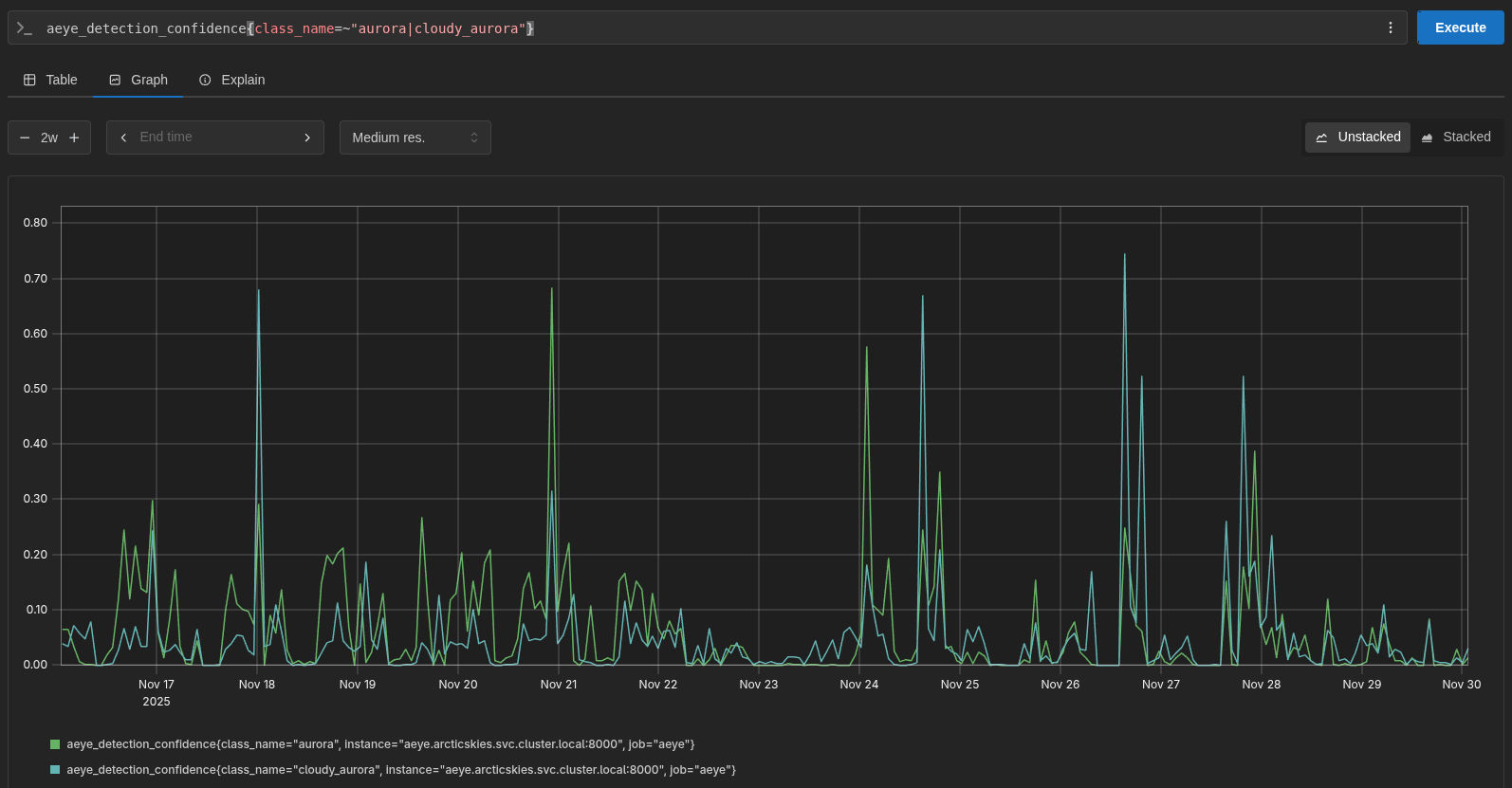
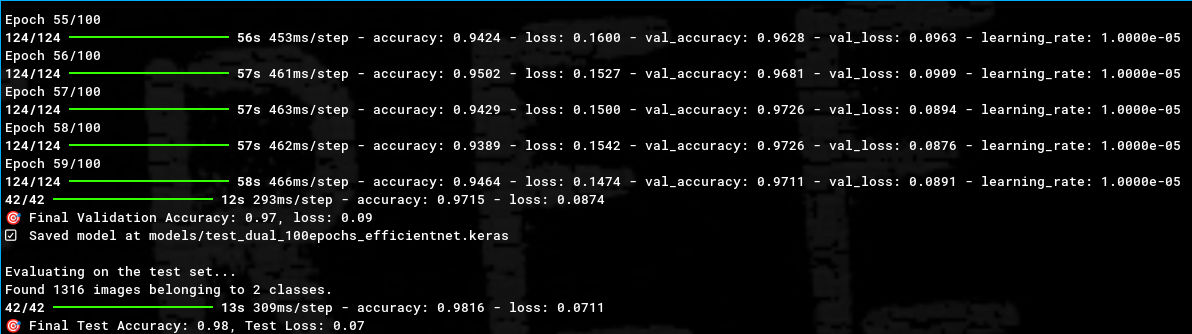
Now with more knowledge, this problem led me to question the binary classification model! Maybe the problem wasn’t the clouds, maybe the problem was the lack of all the adjustments I had made so far! More images, training, validation, and test datasets, transfer learning… But, fortunately, a multi-class model can also be a binary model, you just have to train it with two classes! I readjusted the images to represent only the two classes and… what a beautiful thing, 98% accuracy on the final test!
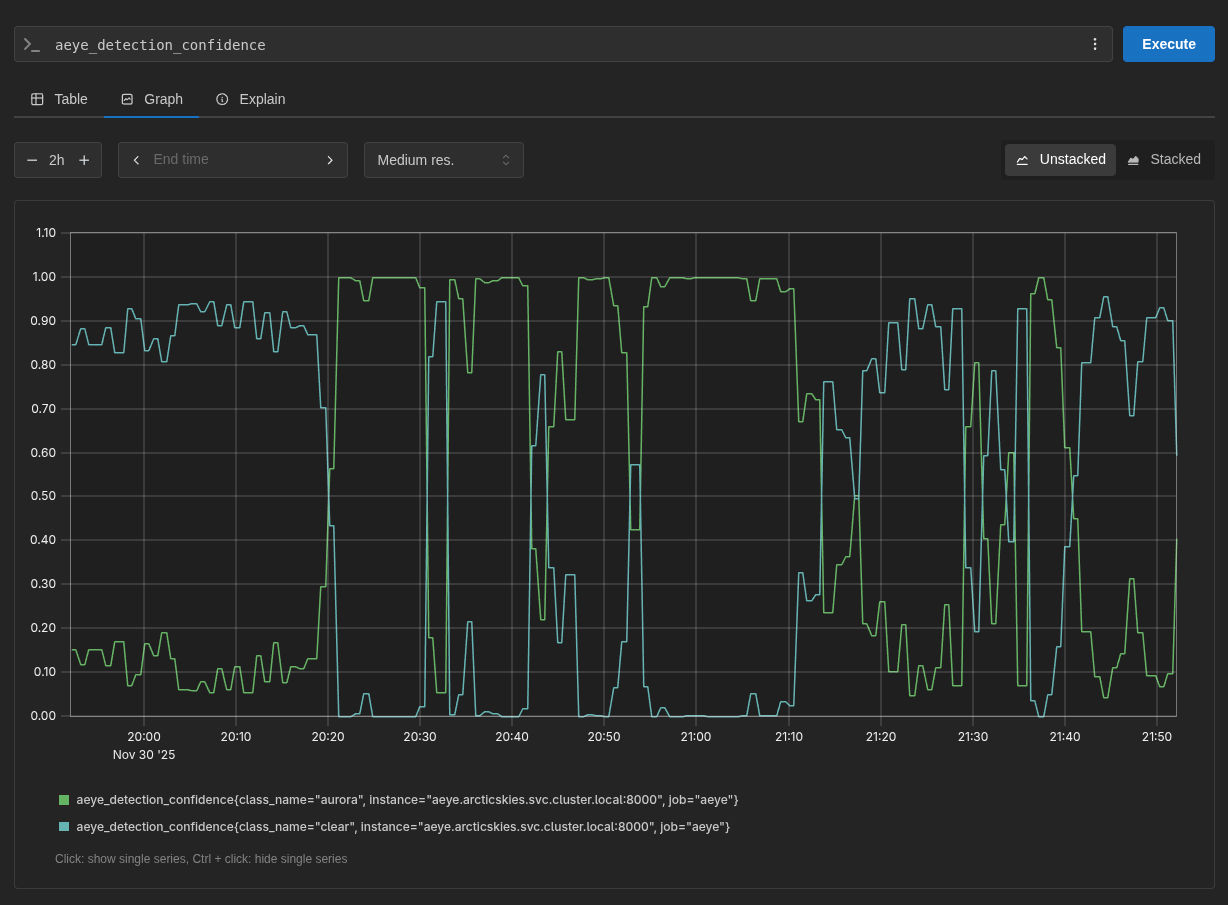
As of the writing of this article, the model has been running and observing the stream for a few weeks. And sure, sometimes it still marks some clouds or other artifacts as auroras, but it very quickly corrects that decision a few frames later. These occasions are rare and, in most cases, it’s correct, which has helped me know when there are auroras to make the timelapse videos!
Just the Alerts Left… But…
Now that the model is tested and functional, it’s time to take care of the alerts. If it were just for me, some alerts made in Grafana IRM would be perfectly fine. However, I want anyone to be able to subscribe to them, whether to have them in their Discord/Slack/email channels and be able to watch the stream and observe the northern lights when they are visible! If only my main server hadn’t died and I wasn’t now in the middle of changing my home lab setup!