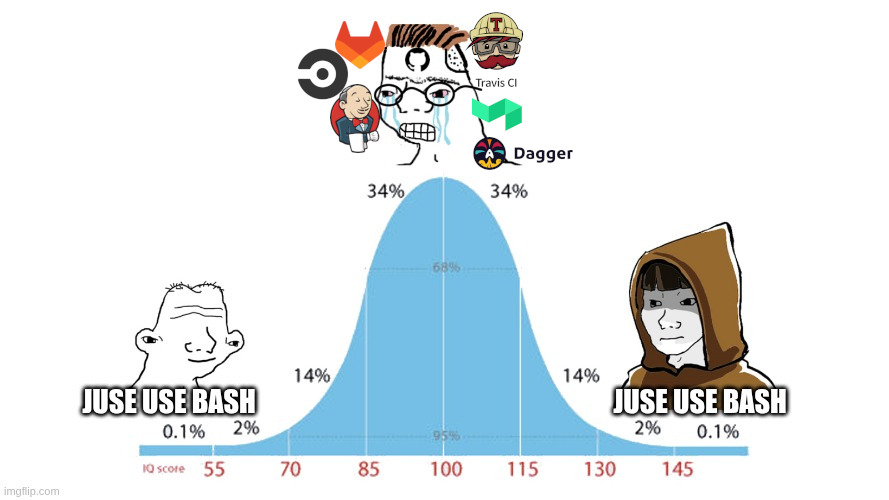
Hot take: CI environments are just holding us back!
I have always been a huge fan of GitHub and GitHub Actions. They were always two tools that together just worked… Or at least they used to! Lately I have noticed that GitHub is extremely slow and feedback loops are becoming longer and harder to reproduce. Not that it was super fast before, but now it is painfully slow.
This last run was the final straw that made me investigate the matter deeply. More than eight minutes for a simple multi architecture build with very few steps! This cannot be right. It makes no sense at all.
Am I doing something wrong? Is GitHub Actions really that bad or am I just falling for the rumors? With that said, I decided to look into alternatives and completely rewrote the workflow.
The search for consistency and the secret management problem
I created a Taskfile with all the necessary tasks for the project: testing, building the image, everything. The goal? I want everything to run the exact same way regardless of the environment I am in. All tasks from start to finish must be able to run on my machine, in a CI environment, or on any contributor’s machine.
But for this to happen, I first had to solve another problem: secret management. This has actually been another huge frustration with GitHub and GitHub Actions. Since personal accounts cannot create secrets shared across all projects, I end up having to duplicate configurations across all repositories. And when it is time to rotate one of them, you just whistle and look the other way to avoid the hassle.
I kept researching what to use and eventually settled on Infisical. It has a great web interface, supports OIDC and pretty much any authentication protocol. The command line tool (CLI) is easy to use, highly intuitive, works like a charm and can be hosted anywhere, or we can simply use their cloud solution.
The reality check: GitHub Actions vs My machine
After rewriting the workflow, the results were stupidly revealing. It took GitHub Actions over 7 minutes to run a multi architecture build and under 1 minute on my machine!
I swear I tried to make things hard for my computer. I deleted all images to force rebuilding all layers, but still… GitHub Actions consistently took over 7 minutes and my machine consistently took under 1 minute.
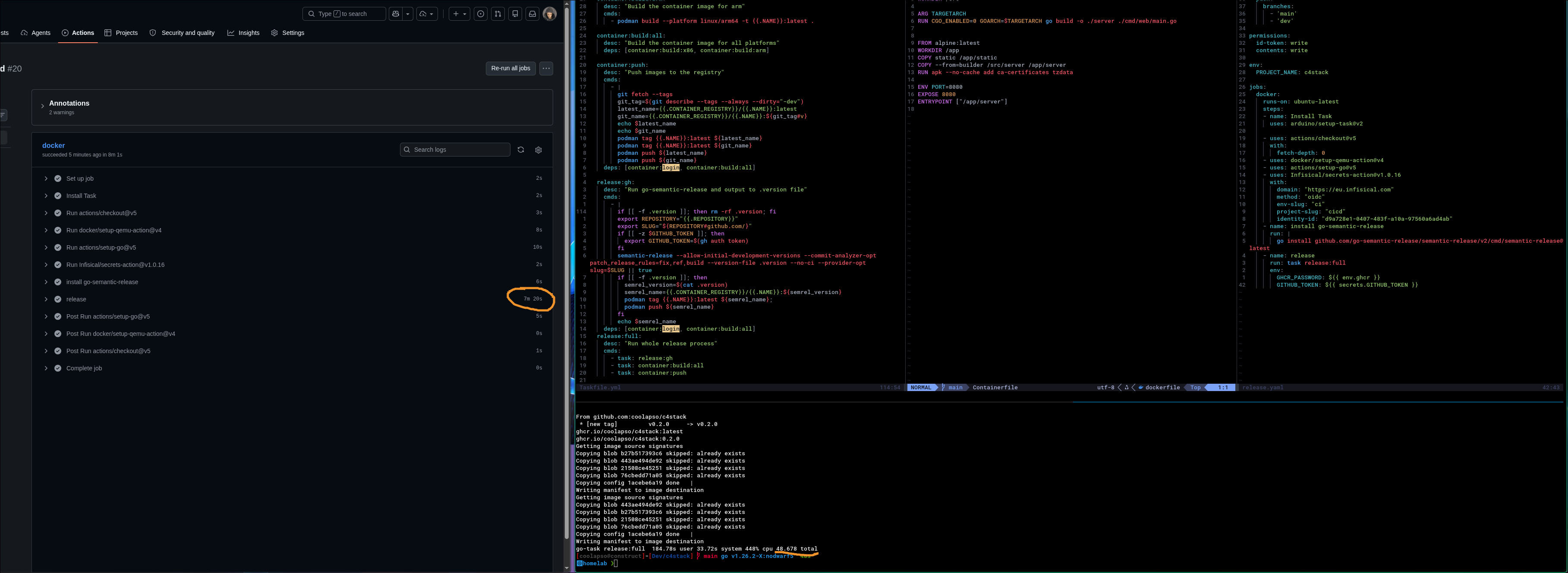
We could assume GitHub Actions is putting free tier users on very limited machines and therefore it runs slower. Maybe. But I suspect GitHub Actions just became too bloated and GitHub is indeed going through a terrible period regarding their infrastructure.
Since I started this, I decided to clear my doubts. I had to understand if there is an actual problem with GitHub Actions or if I am the one doing something wrong. To do so, I decided to investigate how other platforms perform.
The ordeal of testing new CI platforms
First, I decided to test a relatively new kid on the block: Buildkite. I do not want to go into great detail here, but we did not click at all, to the point I gave up after an hour of trying. Either I am very dumb or it just completely fails the user experience test. I want to believe it is the latter!
Next up, I decided to try another one I had never seen before: Octopus. Well, it was not at all what I was looking for. It took me more time figuring out how to delete the account I created and, clearly, I must be very dumb, since I could not find where to do it and ended up having to email support. In their defense, they were very quick to handle it.
Already quite frustrated, it was time to try something more familiar: CircleCI. Once again, I stumbled upon a ton of problems related to Podman and Docker. The time I have allocated for this research is limited, and this reminded me exactly of the reason I got so annoyed with GitlabCI many years ago.
Cloud hosted CI environments are hard to replicate locally, which makes configuration much more complicated. The feedback loop is torturous: edit the file, make a git commit, push, wait for everything to run until the next error and repeat the process. There is really no simple way to shortcut this!
By this time, I have been at it for way too long. I start questioning my life choices, wondering if I should try Earthly (Earthbuild) and Dagger, or if I simply say to hell with all of this.
I even created a workflow with Dagger, but it did not last long. I cannot process Dagger and I fail to understand the tool’s vision. It is so verbose, it takes so much work to get anything done just to, in my eyes, achieve nothing. If I had to go down this route, I still think Earthbuild is the best option. I even created the AUR package (which I intend to maintain because I like the project’s vision), however, after a brief pause, it hit me: but what for?
Why on earth am I trying to follow this path? What is my actual goal here? I am just adding another layer of complexity to achieve so little. Not to mention I am straying away from industry standards. And they are standards for a reason (nor not!).
Back to testing (and to the “standards”)
Since I had come this far, I was not going to stop here. I wanted answers! I refocused on the initial goal: comparing different CI platforms.
After fighting with the various workflow steps in CircleCI, I finally got the pipeline running. It took 3m27s in total, with 1m32s spent on the build process. Now we are talking!
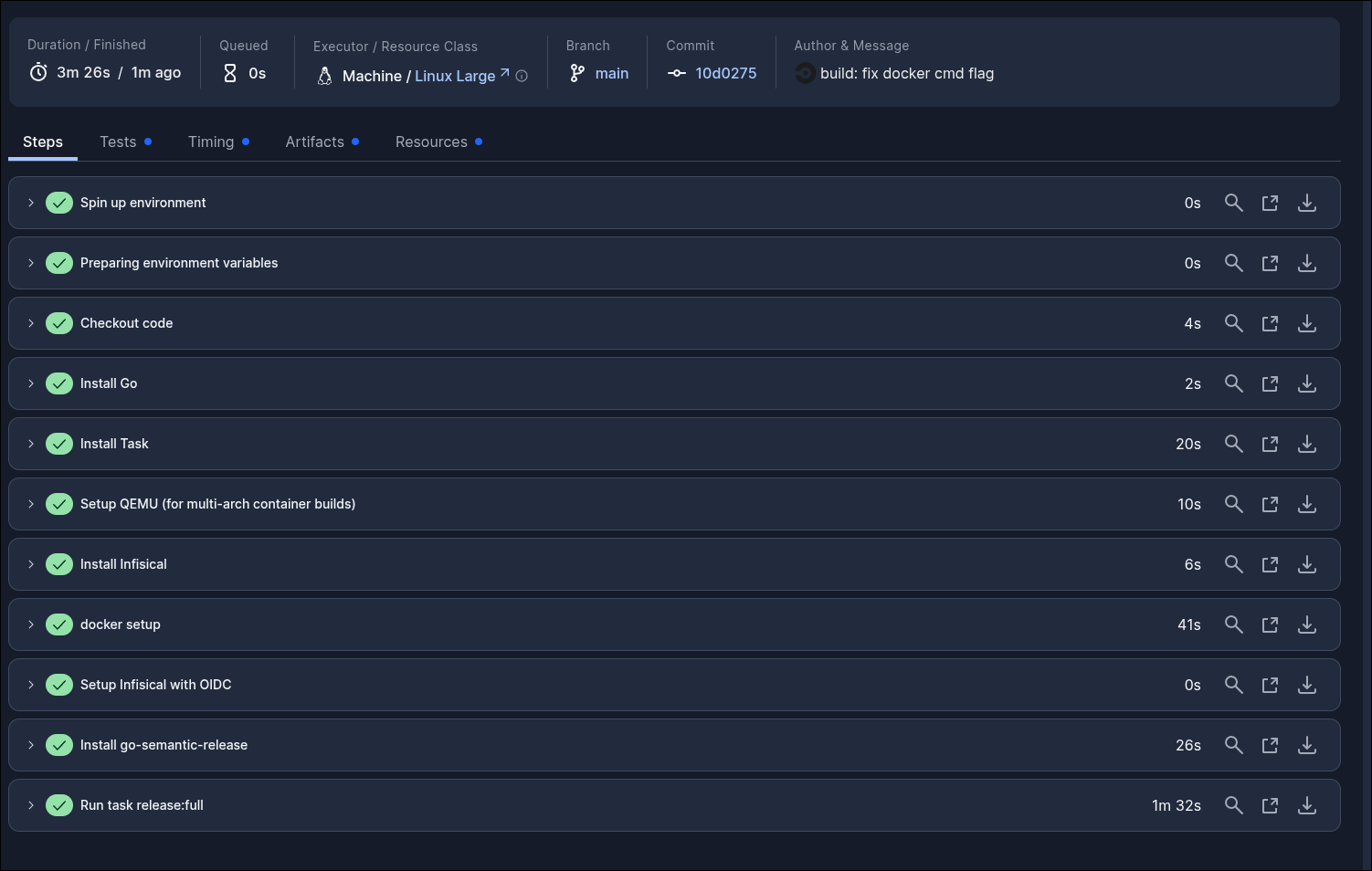
The issues seemed to center mostly around Podman. Apparently, CI environments do not really like it. On my machine I default to Podman (I think it does a much better job), but once again, straying from industry standards caused problems.
I made some changes to the Taskfile to use Docker. This way, hosted CI environments can use Docker, and I can keep using Podman through the podman-docker package (which acts as a proxy and converts Docker commands to Podman). Nobody gets upset and everything becomes simpler.
To get a fair comparison, I ran the pipeline on GitHub Actions again, but this time I removed the Podman installation and used the official Action to install Docker Buildx to support multi architecture builds. To my surprise, the build took a total of 4m18s and the build process alongside the release took 2m48s. This I was not expecting! Much better, but still lagging behind CircleCI or my own machine.
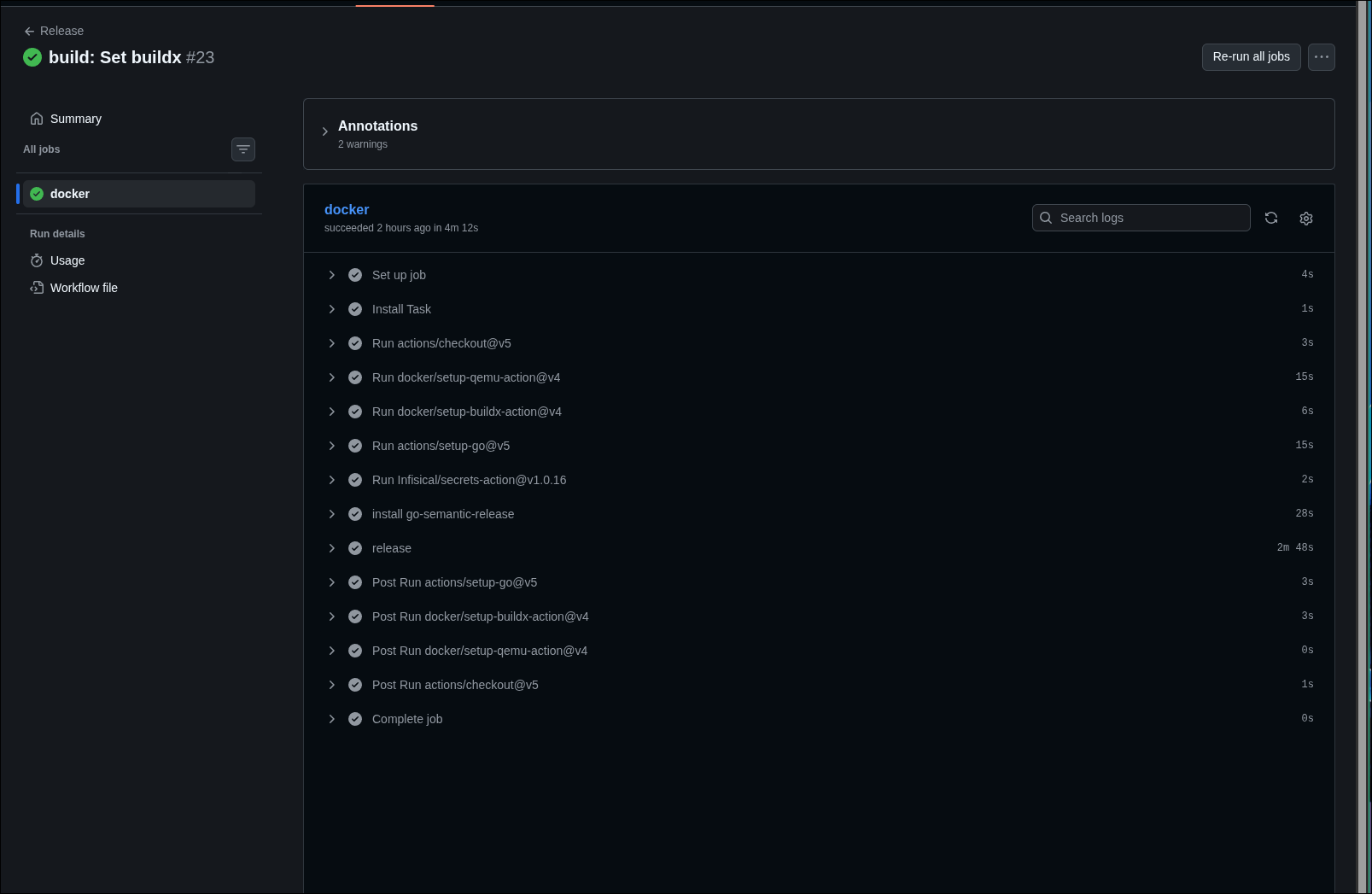
The main differences? Unlocking Docker and the fact that the Taskfile, instead of doing build, tag and push sequentially, now does everything at once. I used the --push and -t flags directly in the build command:
build_cmd="docker buildx build --push --platform linux/amd64,linux/arm64 -t ${latest_name} -t ${git_name}"
The return to Buildkite (and the memory saga)
After so many battles, and because I am as stubborn as a mule, I decided to backtrack and give Buildkite another chance.
Turns out the problem really was mine! After battling with CircleCI (which is much better documented) and figuring out what was causing the issues, I just had to tweak a few things in Buildkite. Everything was going wonderfully well until:
2.087 go: downloading github.com/aws/aws-sdk-go-v2/internal/endpoints/v2 v2.7.7
2.102 go: downloading github.com/go-playground/locales v0.14.1
45.41 github.com/ugorji/go/codec: /usr/local/go/pkg/tool/linux_amd64/compile: signal: killed
------
Containerfile:7
--------------------
   5 |
   6 | ARG TARGETARCH
   7 | >>> RUN CGO_ENABLED=0 GOARCH=$TARGETARCH go build -o ./server ./cmd/web/main.go
   8 |
   9 |
--------------------
ERROR: failed to build: failed to solve: ResourceExhausted: process "/bin/sh -c CGO_ENABLED=0 GOARCH=$TARGETARCH go build -o ./server ./cmd/web/main.go" did not complete successfully: cannot allocate memory
task: Failed to run task "release:full": task: Failed to run task "container:push": exit status 102
🚨 Error: The command exited with status 201
user command error: exit status 201
The runner ran out of memory? This story seems to have no end in sight. Luckily it is possible to request a server with more muscle, and then it ran! It took 2m18s to run the pipeline from start to finish on a LINUX_AMD64_4X16 server (4 cores, 16GB Memory). Ok, it is the fastest of the bunch so far. But is it worth it?
To settle this definitively, I decided to test two more simple options: Blacksmith and GitHub Actions with a self hosted runner on my machine.
Blacksmith was quick to evaluate: it does not support personal accounts, only organizations. Goodbye!
For the self hosted runner, since I already have most tools installed on my machine, I commented out the environment setup parts in the file and focused solely on the build and push. But once again, living on the bleeding edge comes with problems. The --push flag is not implemented in the podman-docker proxy, so I had GitHub Actions yelling at me:
Error: unknown flag: --push
See 'podman buildx build --help'
task: Failed to run task "release:full": task: Failed to run task "container:push": exit status 125
Error: task: Failed to run task "container:push": exit status 125
There is actually an open Pull Request on their repository to implement this, but it was opened three years ago and seems to have been abandoned. Anyway, I think I will just go back to the mother tool (Docker) and leave Podman aside for a little while longer. As soon as I swapped podman for docker, everything worked as expected, and it turns out… GitHub Actions itself is not that slow with decent machines! Just over a minute for the build and release process!
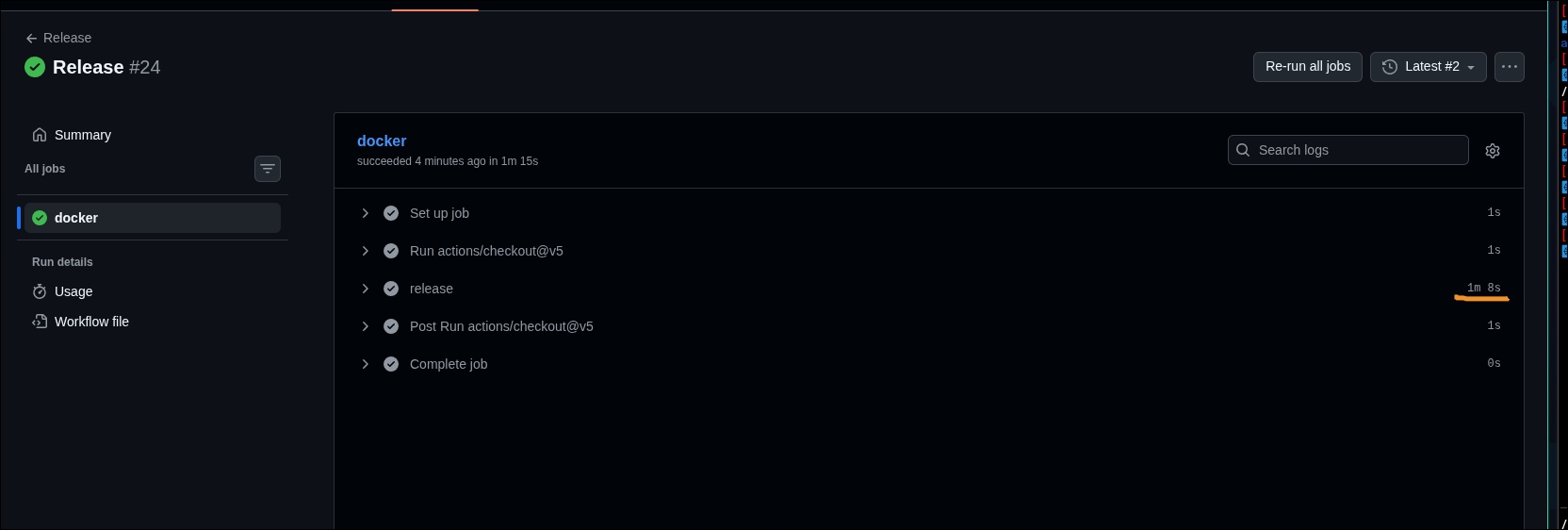
Timing Summary
Just so it is completely clear where my frustration comes from, here is the summary of all the time invested and the results of this little experiment for the same multi architecture build:
| Platform / Environment | Total Time | Build Time | Additional Notes |
|---|---|---|---|
| My machine (Initial) | < 1m 00s | - | Full layer rebuild |
| GitHub Actions (Initial) | > 7m 00s | - | Too slow and inconsistent |
| Buildkite | 2m 18s | - | LINUX_AMD64_4X16 server (RAM upgrade required) |
| CircleCI | 3m 27s | 1m 32s | |
| GitHub Actions | 4m 18s | 2m 48s | Optimized workflow, but behind the competition |
| GitHub Actions (self hosted) | - | 1m 8s | no setup process |
With these results in hand, it looks like my intuition was both right and wrong! GitHub Actions is indeed too slow when compared to the competition, but it can be quite fast when optimized and running on self hosted runners. This leads me to believe that GitHub’s problems lie mostly at the orchestration and network infrastructure level, as during the runs I noticed the process often stalled during the dependency package download phase. Be that as it may, whether self hosted or on the public cloud, any of these services are still way too slow for my taste, which completely destroys feedback loops and productivity!
Conclusion
Do not use CI environments if you do not strictly need them! Use Makefiles, Taskfiles or even simple shell scripts to standardize your pipeline process, and wait for the exact moment when the need to actually use CI Runners appears.
I have been lazy in this regard. Since CI is what is preached across the industry, I assumed it was the right path for everything, to the point of using it extensively both personally and professionally. But I was never very good at following the herd and sooner or later I start questining it!
CI environments add extreme complexity. When something fails, feedback loops are agonizing (make the change, commit, push, wait an eternity, fail, repeat). At least for personal projects, I am going to completely stop using CI platforms. Why?
- The environment is already there: On my machine or any collaborator’s machine, the required tools will already be properly installed. There is no need to stand around waiting for the environment to set everything up from scratch on every run.
- Trust and Security: My computer is a high trust environment. Unlike cloud hosted systems, I know the setup intimately and there is no opaque telemetry plastered all over the place.
- Fewer Abstractions: I do not need to rely on third party actions that often end up compromised or abandoned.
- Feedback Speed: I develop and run the tasks. If one fails, I can run just the exact step I need to fix the issue. The nightmare of waiting for the pipeline to run from start to finish just to discover the next error in line is over.
Of course, there are exceptions dictated by scale or utility. For example, using CI to run tests on a Pull Request to help with the review process, or when the project grows to a point where it is safer and easier to isolate the process on a cloud runner than trying to guarantee the security of the local machines of dozens of different contributors. At that stage, the sluggishness and complexity of CI environments simply become a perfectly justifiable maintenance cost. However, regardless of scale, I believe every workflow should be designed so it can run on any machine, with actions properly restricted by appropriate access controls! Now, completely relying on the CI environment to go from development to production? I still think it is not a good idea.
With all this, what I mean is: be critical of your choices, keep your processes simple and avoid adding tools you do not really need!